
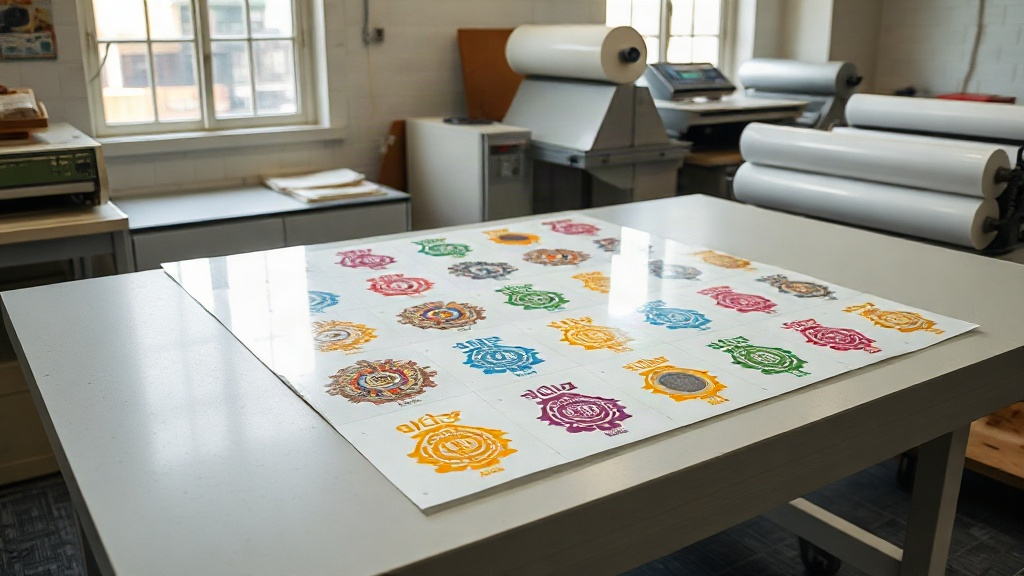
If you run a custom apparel business, you know that efficiency and cost-effectiveness are key to staying competitive. Enter the DTF gangsheet – a game-changer in the world of direct-to-film printing. Unlike traditional DTF printing where you print one design at a time, a gangsheet allows you to arrange multiple designs on a single film, maximizing your printer's output and minimizing waste. In this guide, we'll dive deep into what a DTF gangsheet is, how to create one, and why it should be an essential part of your production workflow.
What is a DTF Gangsheet?
A DTF gangsheet is a large sheet of transfer film that contains multiple designs printed together. The term 'gang' refers to grouping multiple items together, and in this context, it means grouping several graphics onto one sheet. This method is particularly popular among small to medium-sized apparel businesses because it drastically reduces the time and cost per print. Instead of loading the printer with individual sheets for each design, you create a single file that includes all the designs you need, print it once, and then cut them apart after transfer.
How Does DTF Printing Work?
Before we delve into gangsheets, let's briefly recap how DTF printing works. Direct-to-film printing involves printing your design onto a special film using a DTF printer. The design is printed with water-based inks, and then a hot-melt adhesive powder is applied to the wet ink. After shaking off the excess powder, the film is cured in an oven or with a heat press. The resulting transfer can then be applied to various fabrics using a heat press. DTF printing is versatile because it works on cotton, polyester, blends, and even hard-to-print materials like nylon and leather.
Why Use a DTF Gangsheet?
The benefits of using a DTF gangsheet are numerous, especially for businesses that handle multiple orders or produce inventory in advance.
- Time Efficiency: Printing one large sheet with many designs takes far less time than printing each design individually. You set up the printer once, and it runs continuously, reducing downtime between jobs.
- Cost Savings: By maximizing the use of film and ink, you reduce waste. You also save on labor costs because you spend less time handling individual sheets.
- Consistency: When you print multiple designs on the same sheet, they all go through the same printing and curing process, ensuring consistent color and quality.
- Scalability: If you need to produce 50 shirts with different designs, a gangsheet allows you to print all 50 designs at once, then press them one by one. This is much faster than printing each design separately.
When to Use a DTF Gangsheet
Gangsheets are ideal for:
- Batch production of multiple designs for a single client (e.g., a sports team with different names and numbers).
- Creating inventory for popular designs that you sell regularly.
- Printing sample packs or variety packs.
- Maximizing efficiency during peak seasons when order volume is high.
How to Create a DTF Gangsheet
Creating a gangsheet requires some planning and the right tools. Here's a step-by-step guide:
- Collect Your Designs: Gather all the designs you want to include. Ensure they are high-resolution (300 DPI is recommended) and in PNG format with transparent backgrounds.
- Choose Your Film Size: DTF film comes in various widths (e.g., 13", 17", 24") and can be cut to length. Decide on the sheet size based on your printer's capabilities and the number of designs.
- Use Gangsheet Software: There are specialized software tools like DTF Gangsheet Builder, or you can use graphic design software like Photoshop or Illustrator. The goal is to arrange the designs efficiently to minimize wasted space. Nest them closely, but leave a small gap (about 0.25 inches) between designs for easy cutting.
- Add Registration Marks (Optional): If you plan to use a cutting machine, add registration marks to help align the cuts.
- Print and Cure: Print the gangsheet using your DTF printer, apply adhesive powder, and cure it. Then, cut the designs apart.
Tips for Efficient Gangsheet Layout
- Rotate designs to fit better, but avoid rotating text if it compromises readability.
- Group similar colors together to reduce ink changes if your printer allows.
- Leave a margin around the edges of the film to prevent curling.
- Use nesting tools in your software to automatically arrange designs.
Common Mistakes to Avoid with DTF Gangsheets
Even experienced printers can make mistakes when creating gangsheets. Here are some pitfalls to watch out for:
- Overcrowding: Packing too many designs too closely can lead to cutting errors and ink bleeding. Always leave a small gap.
- Inconsistent Sizing: Double-check that all designs are scaled correctly. A small error in size can ruin the final print.
- Ignoring Film Orientation: DTF film has a printable side and a non-printable side. Printing on the wrong side will ruin the sheet.
- Inadequate Curing: If the powder isn't fully melted, the transfer won't adhere properly. Follow your powder's curing guidelines.
Maximizing Profit with DTF Gangsheets
For businesses, the ultimate goal is profitability. Gangsheets can significantly improve your bottom line. By reducing labor and material costs, you can offer competitive pricing without sacrificing quality. Additionally, the speed of gangsheet production means you can take on more orders and turn them around faster, increasing customer satisfaction and repeat business.
Frequently Asked Questions
Can I use any DTF printer for gangsheets?
Yes, most DTF printers can handle gangsheets as long as the film width fits your printer. However, larger printers with wider film capacities are more efficient for big gangsheets.
How do I cut a DTF gangsheet?
You can cut by hand with scissors or a rotary cutter, but for precision, use a vinyl cutter or a laser cutter. If you have many designs, a cutting machine with registration marks is recommended.
What is the maximum size of a DTF gangsheet?
The size is limited by your printer's maximum print width and the length of film you can handle. Common widths are 13", 17", and 24", but you can print continuous lengths up to 100 feet or more with roll-fed printers.
Do I need special software to create a gangsheet?
Not necessarily; you can use any graphic design software. However, dedicated gangsheet software can automate nesting and save time.
How long can I store a DTF gangsheet before use?
When stored in a cool, dry place away from direct sunlight, DTF transfers can last for several months. For best results, use within a few weeks.